v3.0

Now with iCloud sync (iOS) and multi-wedding support for Professionals

Wedding Player

Wedding Player

The wedding music app for a ceremony without a DJ

Time every moment, trim and fade each track, then hand the phone to a friend in a locked Live Mode. Everything plays gapless and fully offline once your tracks are downloaded, so no DJ is needed for the ceremony.

Tap below to Play Demo

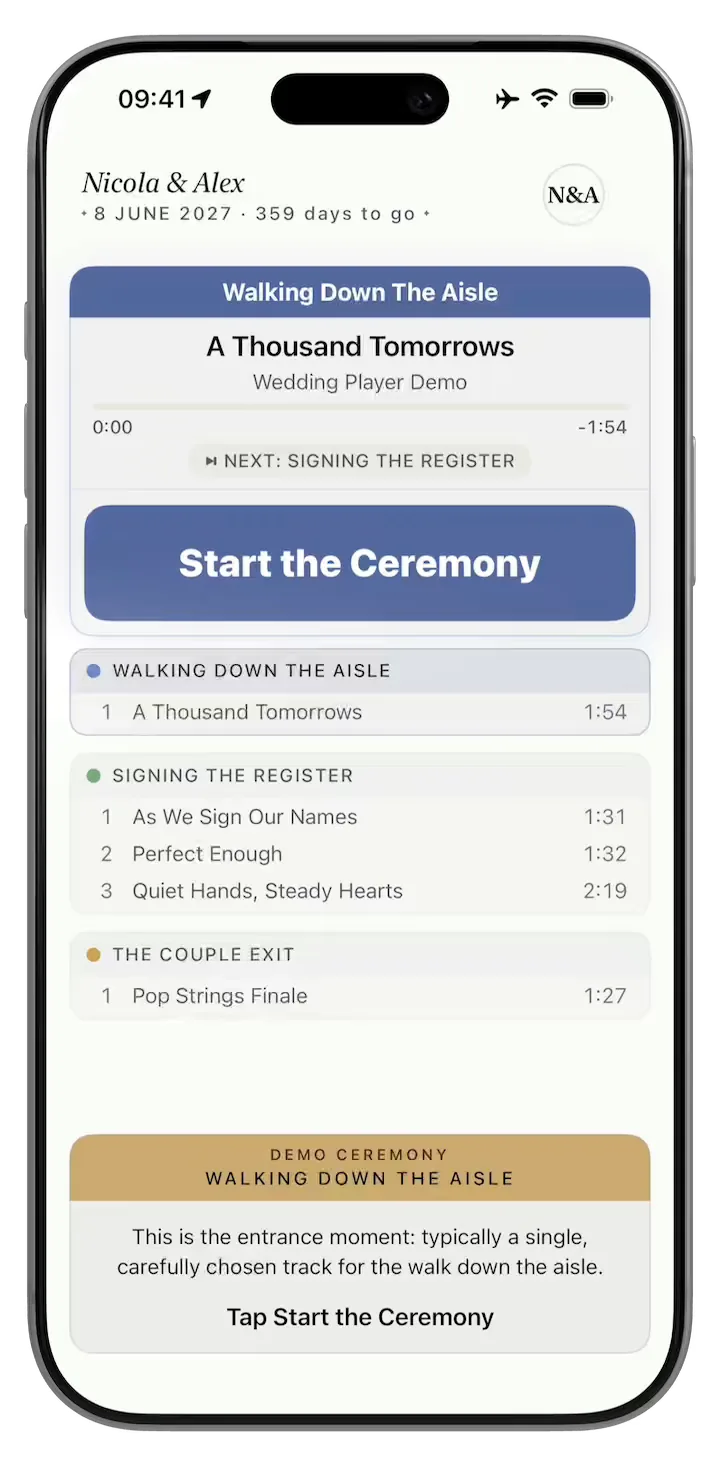
Wedding Player demo: a guided ceremony walkthrough

Pinch to zoom in

Download for free to plan your music.

Couples pay £12.99 once to unlock all features for a single wedding.

No subscription, ever.

Running multiple weddings?
Professional Licence
In the Press
"Ceremony music often gets left until surprisingly late in the planning process, even though it completely shapes the atmosphere of the moment. Wedding Player was built specifically to help couples organise their wedding ceremony soundtrack."

Zoe Burke, Head of Brand at Bridebook

"I love that the app works offline. That was incredibly smart, because you can never rely on Wi-Fi."

Dave Ginsburg, In Touch With iOS

"It's clean. It's easy to use."

Sharon Underwood, Wedding Mayhem

"It downloads it all to the phone, so you don't need Wi-Fi. Woodland wedding, church wedding, there's no Wi-Fi... There's a lot of tech there for £7.99."

Allison Hargreaves, CEO, Guides for Brides

As featured in

Every cue, exactly when you need it

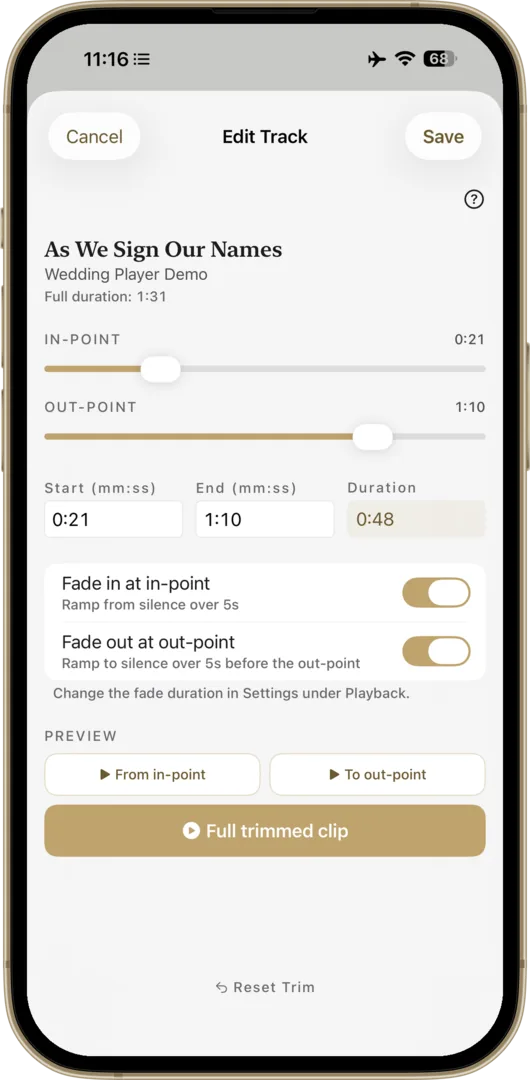
Trim Every Track to the Second

Intro too long? Trim any song to start and end exactly where you want. Set your fades, preview it, done. No laptop, no other apps. What you hear is what plays on the day.

Trim and Fade editor

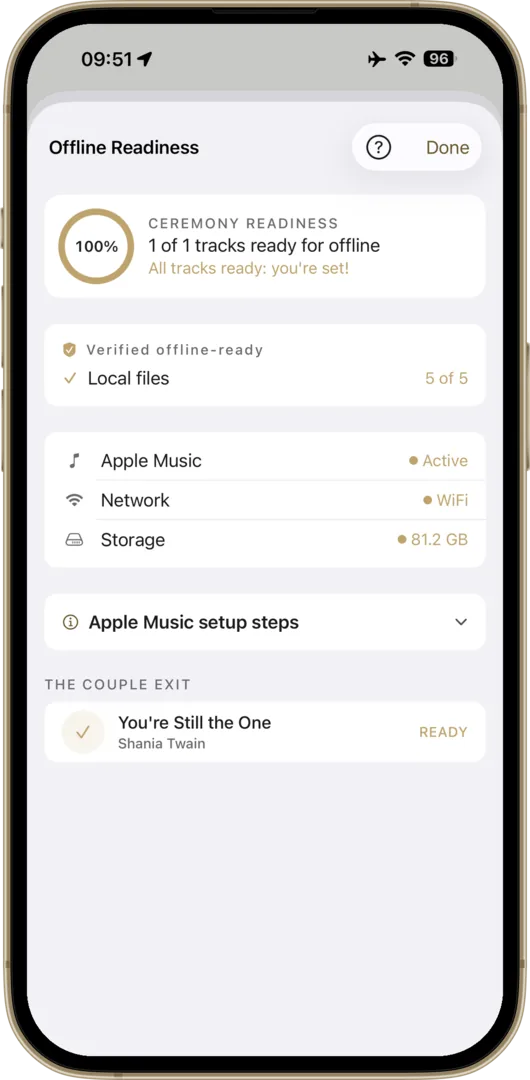
Zero Signal? No Problem.

Venue WiFi can't be trusted, so we don't use it. Every track lives on your phone, and the app checks they're all there before the day. No streaming, no buffering, works in airplane mode.

Offline Readiness check verifying all tracks are stored on device

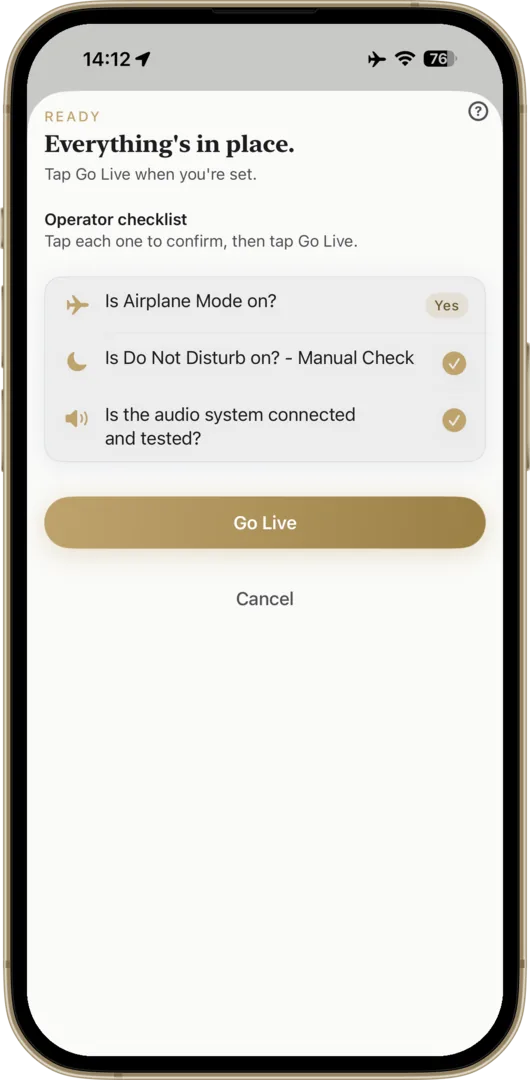
Panic-Proof Go Live Check

One screen checks everything before you go live: tracks downloaded, airplane mode on, battery full, Do Not Disturb set. Until it's all ready, the Go Live button stays disabled, so you can't start before everything's set.

Pre-Ceremony Readiness check confirming tracks downloaded, airplane mode, battery and Do Not Disturb before going live

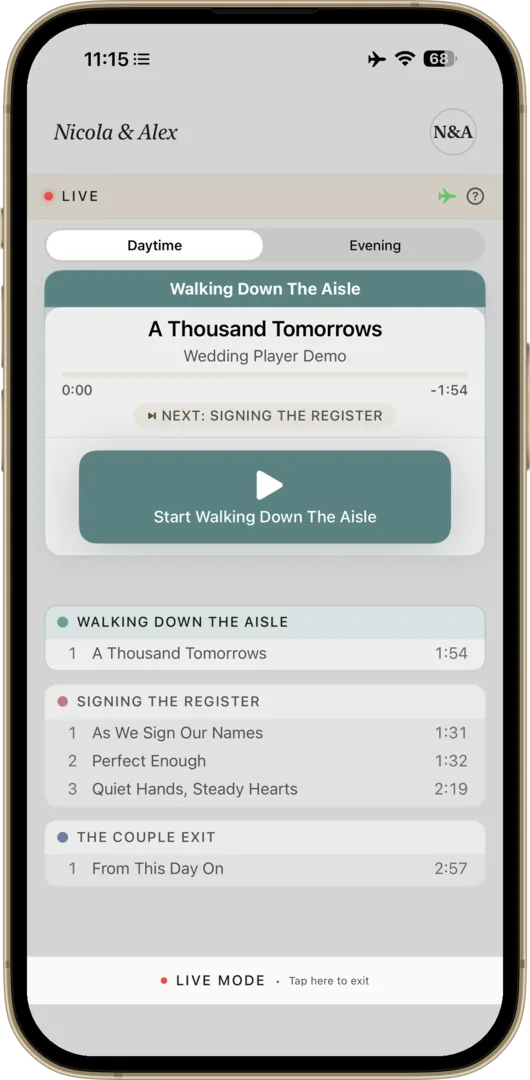
Dedicated Go Live Mode

Tap Go Live and everything locks. No accidental taps, no wrong version. Big controls, one-tap fade when the moment's right.

Live Mode with the running order locked and oversized controls so a friend can press play
Features

Seamless Transitions

Smooth crossfades. No awkward silences, ever.

Ceremony Timeline

Build moments for each part of the day, each with its own songs and fades. Play through, or loop until you're ready to move on.

Volume Normalisation

Quiet and loud tracks play at the same level. No frantic adjustments.

Loop & Auto-Advance

Set moments to loop until you're ready. Auto-advances to the next moment when you are.

Try Before You Buy

Free demo with sample tracks. Experience the full app before purchasing.

Unlimited Moments

Ceremony, drinks, reception. Add as many as you want, split into daytime and evening, to plan the whole day.

One purchase covers iPhone and iPad (and Android on Google Play). Adjustable text size, automatic light and dark mode.

iCloud Sync

Your wedding, backed up and in sync

Turn on iCloud and your whole ceremony is safe, always current, and ready on whatever device you pick up on the day (iOS).

Safe if a device is lost

Your wedding backs up to iCloud automatically. Lose, break, or upgrade your phone and it is waiting for you the moment you sign back in.

Plan on one, play on another

Build your ceremony on your iPhone, then run it from your iPad or a second iPhone on the day. Everything stays perfectly in step.

Always up to date

Every change syncs across your devices on its own. No exporting, no copying, nothing to remember.

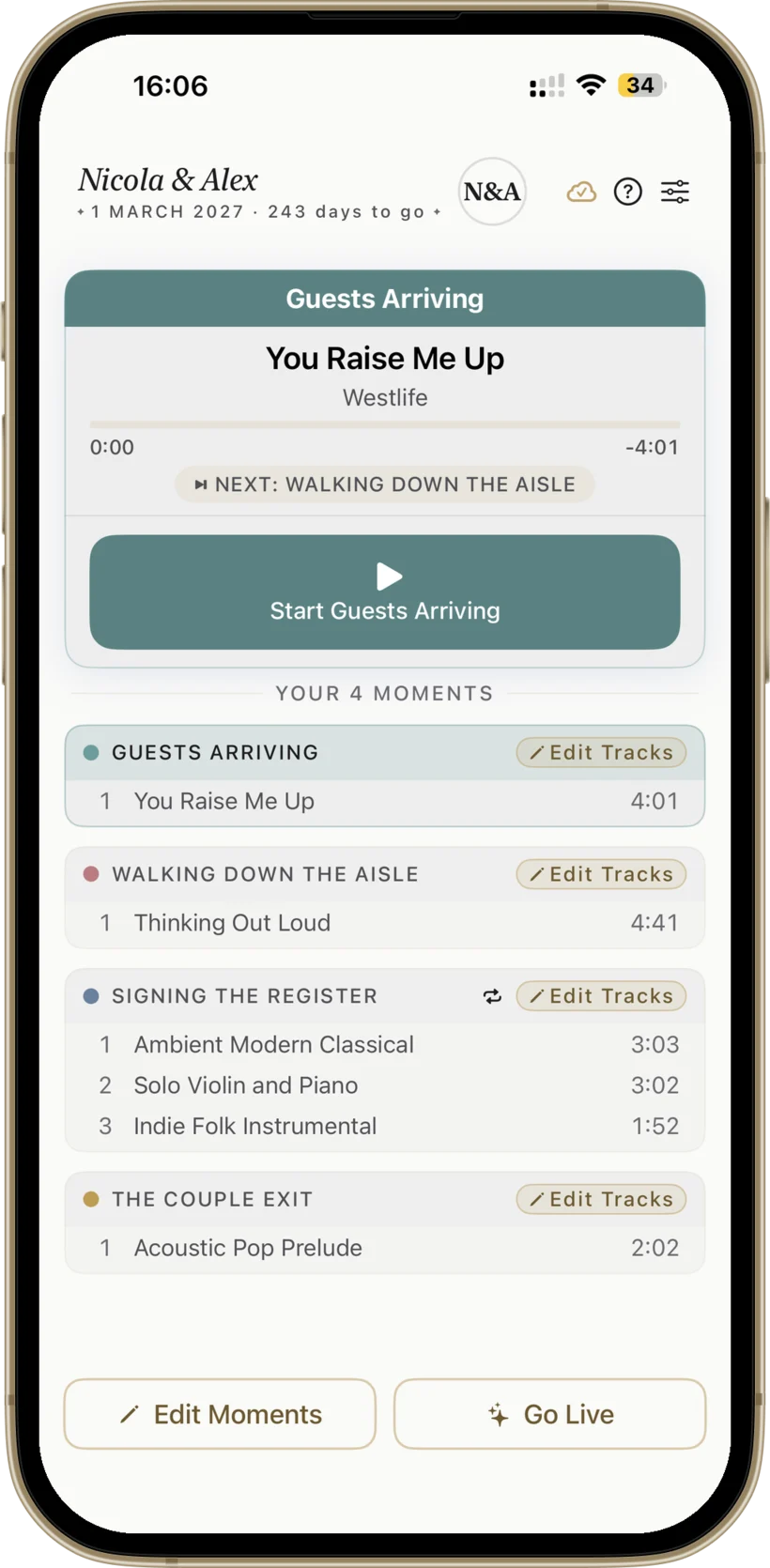
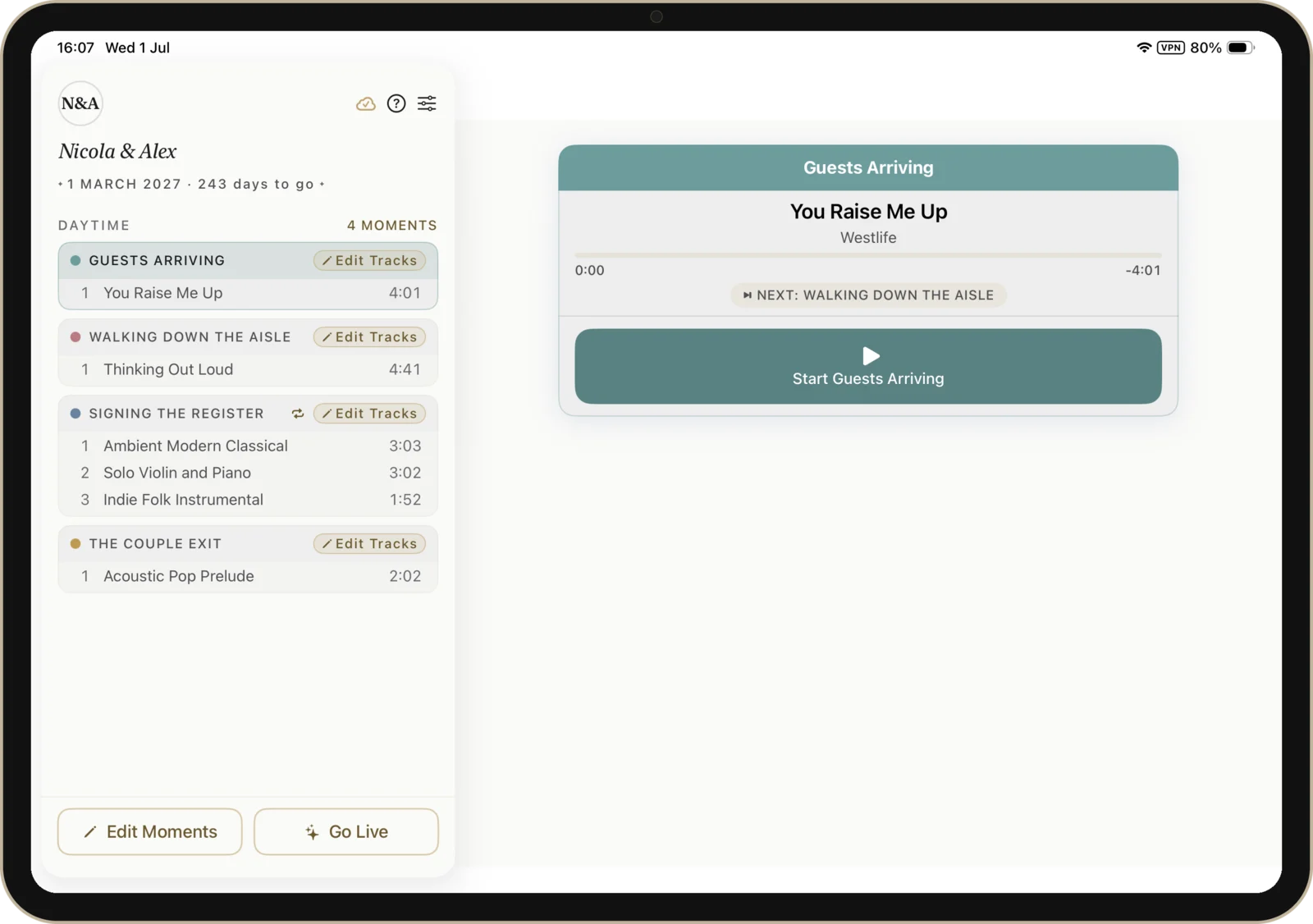
Wedding Player on iPhone showing the Nicola and Alex ceremony, in sync with the iPad Wedding Player on iPad showing the same Nicola and Alex ceremony in split view, in sync with the iPhone

The same ceremony, in step on iPhone and iPad. Build it on one, run it on the other.

Your Music, Your Way

Three ways to add music. Mix any of them.

Apple Music

Apple Music (iOS)

Already on Apple Music? Add any song from your library or the full catalogue. How Apple Music works in Wedding Player.

Wedding Player

Wedding Player Originals

40 licensed instrumental tracks, included free, including 11 prelude pieces for as guests arrive. New ones added over time, no update needed.

Your own files

Your own files

Add your own MP3, M4A, or WAV. Ripped CDs, purchased tracks, your own recordings. How to transfer your own music.

Mix any of the three in a single ceremony timeline. Every track stored offline.

More than a playlist

A playlist plays songs. A ceremony needs more.

Yes, Wedding Player is a wedding playlist app: build your ceremony playlist from Apple Music, Wedding Player Originals and your own files, then make it ceremony-ready with trims, fades and cue timing, playing gapless and fully offline once your tracks are downloaded.

How Wedding Player compares with a Spotify or Apple Music playlist for ceremony music
For your ceremony Spotify or Apple MusicWedding Player
Reliable offline playback1 Partial Yes
Locked operator mode No Yes
Trim and one-tap fades on cue No Yes
Ceremony moments timeline No Yes
Pre-ceremony readiness check No Yes
  • 1 Spotify and Apple Music play offline only with a paid subscription and every track downloaded first. Wedding Player stores each track on the device, so it always plays in airplane mode.

Read the full comparison

Without a DJ

Looking for a wedding DJ app?

Couples searching for a wedding DJ app are usually after one thing: control of the ceremony music. The right track as guests arrive, the right track as you walk down the aisle, and no awkward silence in between.

That is what Wedding Player is built for. You create a moment for each part of the ceremony, trim and fade every track to the second, and set moments to loop until you are ready to move on. On the day, a friend or your venue co-ordinator presses play in Live Mode, where the running order is locked and the controls are deliberately oversized. Everything plays gapless and fully offline once your tracks are downloaded, so venue WiFi never gets a vote.

What it is not is a reception DJ. There is no mixing, no microphone, and no reading the room at 11pm. It does not replace live musicians or your venue's PA system, so agree how you will connect to the speakers in advance. It is free to download on the App Store and Google Play with a demo built in, and couples pay £12.99 once to unlock everything, with no subscription.

For the full walkthrough, read how to play wedding ceremony music without a DJ, or the practical guide to playing music at your wedding without a DJ.

From the Wedding Community
“The music starts when it’s supposed to, fades when needed.”

Sarah Mary Coughlan

Marriage Solemniser

“I was at a meeting with one of my couples in Preston and they opened your app to chat through their music! They said it was a game changer for them.”

Una Haslinger

Celebrant

Pricing

The Cheapest Line on Your Wedding Budget

Couples

£12.99
One-off purchase · No subscription

The cheapest line on your wedding budget. The most important one.

  • Perfect for a single wedding
  • Create unlimited moments for the day and night
  • Add up to 100 tracks per moment
  • Wedding Player Originals, free instrumentals
  • Mix Apple Music tracks (iOS) & custom files
  • Live Mode with locked, panic-proof controls
  • iCloud backup & sync (iOS)
  • 100% offline, works in airplane mode

One-time purchase. No ads. No tracking. Free demo included.

Download on the App Store Get it on Google Play Free to try

Managing multiple weddings? See the Professional Licence →

The Story

Built for a Real Wedding

I built Wedding Player for my daughter Nicola's wedding in March 2026. Nothing on the App Store did what we needed. It worked flawlessly on the day. The venue co-ordinator asked for a copy afterwards, unprompted.

– Don McAllister, father of the bride

Read the full story

FAQ

Common Questions

Is it really a one-off price for couples? Is there a subscription?

Yes, really. £12.99 is the full price for couples: a one-time purchase, yours forever, no subscription, no auto-renewal, no upsells, no hidden costs. We get asked this a lot because most apps in 2026 are subscriptions; for couples, Wedding Player isn't. Both tiers include a free demo, so you can try everything before buying. The separate Professional Licence (£5.99 a month or £49.99 a year, with a free month to start) is only for venues, celebrants, officiants and planners running ceremony music across multiple weddings; couples don't need it.

Is Wedding Player a wedding DJ app?

Not in the reception sense: there is no mixing, no microphone, and it does not replace a professional DJ, live musicians or your venue's PA system. What most couples mean by that search is running the ceremony music themselves without hiring anyone, and that is exactly what Wedding Player is built for: a moment for each part of the ceremony, trims and fades on every track, a locked Live Mode so a friend can press play, and fully offline playback once your tracks are downloaded. It is free to download with a demo built in, and couples pay £12.99 once to unlock everything, with no subscription. Read how to play wedding ceremony music without a DJ.

Do I need an Apple Music subscription?

No. Wedding Player includes Wedding Player Originals, 40 fully licensed instrumental tracks covering every part of the ceremony (11 prelude, 11 processional, 10 signing the register, 8 recessional), with styles from classical (Canon in D, Bach, Mendelssohn) to contemporary (modern piano, indie folk, soul brass). New tracks appear automatically, no app update needed. Apple Music is optional: use it for a specific song from your own library, or stick with Wedding Player Originals and your own audio files.

Why not just use Spotify or Apple Music directly?

Spotify doesn't allow third-party iOS apps to play its tracks, online or offline, so the only option would be remote-controlling the Spotify app: ads on the free tier, no fade control, no ceremony timeline, and no protection if Spotify crashes mid-processional. Apple Music can play your tracks, but on its own it can't mix streaming songs with your custom-edited files in one playlist, has no ceremony timeline, no fade-out controls, and no protection against operator error. Wedding Player builds directly on top of Apple Music and adds all of that. Most songs are on both platforms anyway, and you can always pick from Wedding Player Originals or import any local audio file (MP3, M4A, WAV). Read the full explanation. For the side-by-side, see the full Wedding Player vs a playlist comparison.

What if I need to pause or fade out?

One tap in either Rehearsal Mode or Live Mode. The track fades out smoothly over 2 to 15 seconds (you choose). You watch the room and end the music when the moment is right, not when the track decides to end.

Who presses play on the day?

Anyone you trust: a friend, a family member, your venue co-ordinator. Live Mode locks the playlist so they can't accidentally play the wrong song or the wrong version. The controls are deliberately oversized, designed for nervous hands, not tech experts.

I don't want to hand my personal phone to a stranger. What are my options?

Use iOS's built-in Guided Access mode to lock your phone to Wedding Player and nothing else. The home button, app switcher, notifications, and every other app are all blocked while it's on. Anyone holding the phone can only use Wedding Player. Setup takes 30 seconds. Step-by-step guide here.

What devices does it work on? Is it on Android?

iPhone and iPad running iOS 17 or later, and Android phones and tablets: Wedding Player is now live on Google Play. The Android app is a fully featured equivalent of the iPhone and iPad app (same ceremony engine, same Go Live Mode, same crossfades, same fully offline playback, plus Wedding Player Originals, 40 ceremony-ready instrumental tracks). The one difference is that Apple Music integration is iOS only, so on Android you build your ceremony from your own music files and Wedding Player Originals.

How do I connect to the venue's speakers?

Check with your venue. Many have Bluetooth connectivity to their PA system, so just pair your iPhone or iPad. Others have a 3.5mm aux input or a USB connection. Ask the venue co-ordinator before the day so there are no surprises. Bring a backup cable just in case. Read the full guide.

Is there a free wedding player app?

Wedding Player is free to download on the App Store and Google Play, with a demo so you can try everything before you pay. Couples then pay a one-time £12.99 to unlock all features, with no subscription and no auto-renewal. The separate Professional Licence (£49.99 a year, with a free month to start) is only for venues, celebrants, officiants and planners running ceremony music across multiple weddings.

Can I use a wedding player app instead of hiring a DJ for the ceremony?

Many couples use Wedding Player to run their own ceremony music without a DJ: you build the running order, trim and fade each track, and a friend or your venue co-ordinator presses play in Live Mode. It is a tool to help you run the music yourself, not a replacement for live musicians, a professional DJ, or a venue's PA system, so agree how you will connect to the speakers in advance. See the step-by-step guide to playing music at your wedding without a DJ.

Is Wedding Player a wedding playlist app?

Yes. Wedding Player is a wedding playlist app made for the ceremony. You build your playlist from Apple Music tracks, Wedding Player Originals and your own audio files, then trim, fade and time each moment so it plays gapless and fully offline once your tracks are downloaded. Unlike a raw Spotify or Apple Music playlist, it will not show ads, buffer, or cue the wrong song during the ceremony.

Is there an app for wedding prelude music?

Yes. Wedding Player is an app for wedding prelude music: it includes 11 ready-to-play prelude instrumental tracks, from classical to contemporary, and a ceremony timeline that fades the prelude out and cues the processional on a single tap. See the wedding prelude music app guide.

When does wedding prelude music start and how long should it be?

Prelude music starts as guests begin arriving, usually 20 to 30 minutes before the ceremony, and runs until the processional begins. Plan at least 30 minutes so the room is never left in silence. Wedding Player keeps the prelude and processional in one running order and fades between them on a single tap.
New in v3.0

Now with iCloud sync, so your wedding backs up and stays in step across your iPhone and iPad (iOS). And wedding professionals can keep every couple in its own workspace, switching between them in a tap.

Read full notes →

Your Wedding. Your Music. Perfectly Timed.

Set it up once. Press play with confidence. The ceremony is the one part of the day you can't redo. Make the music perfect.

Download on the App Store Get it on Google Play Free to try
View Press Kit